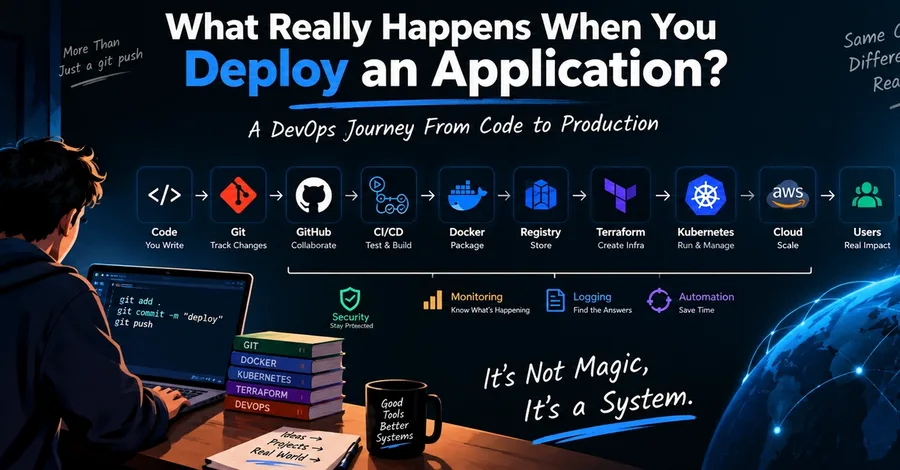

Have you ever wondered what actually happens after you run: git push and somehow your application appears on a server? For beginners, deployment can look like magic. You write code → push to GitHub → wait → application is live. But behind that simple process is an entire system involving Git, CI/CD, Docker, cloud infrastructure, networking, security, and monitoring . Understanding this journey is one of the best ways to understand DevOps. So in this article, let's follow a single application from a developer's laptop all the way to production. The Big Picture A modern deployment pipeline might look like this: Developer ↓ Git ↓ GitHub ↓ CI/CD Pipeline ↓ Tests ↓ Docker Image ↓ Container Registry ↓ Cloud Infrastructure ↓ Kubernetes ↓ Load Balancer ↓ Application ↓ Users And surrounding all of this are: Monitoring Logging Security Networking Infrastructure as Code Let's break it down. 1. Everything Starts With Code Imagine you've built a simple web application. You have something like: my-app/ │ ├── app.py ├── requirements.txt ├── templates/ ├── static/ └── README.md On your laptop, you run: python app.py and everything works. But your laptop isn't production infrastructure. You need a reliable way to move this application to a server. That's where Git comes in. 2. Git Tracks Your Changes You initialize a repository: git init Then: git add . git commit -m "Initial application" Finally: git push origin main Now your source code is stored in a remote repository. Git gives you much more than backup. It allows you to: Track changes Work with branches Collaborate with other developers Review code Revert changes Create releases Connect development with CI/CD This is why Git is one of the fundamental skills for anyone entering DevOps. If you want to strengthen your Git knowledge, I've created: Git Mastery: From Zero to Expert — The Complete Guide to Git, GitHub & GitLab https://yashsonawane1.gumroad.com/l/Gitmastery 3. Something Needs to Detect the Change Your code is now in GitHub. But how does the production server know that you pushed new code? This is where CI/CD enters the picture. A CI/CD platform can detect your Git push and automatically start a pipeline. For example: git push ↓ Pipeline starts ↓ Install dependencies ↓ Run tests ↓ Build application Instead of a developer manually performing these steps every time, the process becomes automated. 4. CI: Continuous Integration The first part is usually CI. The idea is simple: Every time developers make changes, automatically verify that the changes work. A pipeline might execute: Checkout Code ↓ Install Dependencies ↓ Run Tests ↓ Code Quality Checks ↓ Security Checks If a test fails: Code ↓ CI ↓ ❌ Test Failed ↓ Deployment Stops That's a good thing. You don't want broken code automatically reaching production. 5. Now Docker Enters the Picture Suppose your application passes all tests. The next problem is: How do we package it so it can run consistently on another machine? This is where Docker becomes useful. You create a Dockerfile: FROM python:3.12 WORKDIR /app COPY requirements.txt . RUN pip install -r requirements.txt COPY . . CMD ["python", "app.py"] Then build an image: docker build -t my-app . Docker packages the application together with the environment it needs. The basic idea becomes: Application + Dependencies + Runtime ↓ Docker Image This image can then be used to create containers. If you want to learn Docker in a structured way: Docker Mastery: From Zero to Certified — The Complete DCA Exam Guide https://yashsonawane1.gumroad.com/l/docker-mastery-dca-2026 6. The Image Goes to a Registry You now have a Docker image. But where does the production environment get it from? Usually, the image is pushed to a container registry. For example: Developer ↓ Docker Build ↓ Docker Image ↓ Container Registry The registry acts as a place where your container images can be stored and retrieved. Your deployment system can later pull the required image. For example: my-app:v1.0 my-app:v1.1 my-app:v1.2 Now you have versioned application artifacts. 7. Where Does the Application Actually Run? Now we need infrastructure. You might need: Virtual machines Networking Storage Security groups Load balancers Databases DNS Monitoring Creating all of these manually isn't a great long-term strategy. This is where Infrastructure as Code becomes important. 8. Terraform Creates Infrastructure Instead of manually clicking through a cloud console, you can describe infrastructure using Terraform. For example: resource "aws_instance" "app" { ami = "ami-example" instance_type = "t2.micro" } The idea is: Terraform Code ↓ terraform plan ↓ Review ↓ terraform apply ↓ Cloud Infrastructure Now your infrastructure can be: Version controlled Reproduced Reviewed Automated Modified consistently This becomes especially powerful as infrastructure grows. For Terraform certification preparation, check out: Terraform Associate (003) Exam Crash Course https://yashsonawane1.gumroad.com/l/TerraformAssociate 9. But What If We Have Hundreds of Containers? This is where things get interesting. One application might be easy to run. But imagine you have: 100 containers 10 services Multiple servers Multiple environments Thousands of users Managing everything manually becomes difficult. This is one of the problems Kubernetes helps solve. 10. Kubernetes Manages Containers Kubernetes provides a platform for running and managing containerized applications. Instead of manually starting containers, you describe what you want. For example: I want:
3 instances of my application + A stable network endpoint + Automatic restart if something fails Kubernetes works toward maintaining that desired state. A simplified architecture: Kubernetes Cluster │ ┌───────────────┼───────────────┐ │ │ │ Node 1 Node 2 Node 3 │ │ │ Pods Pods Pods │ │ │ Containers Containers Containers You can learn concepts such as: Pods Deployments Services Ingress ConfigMaps Secrets Namespaces Volumes RBAC Scheduling For CKA preparation: CKA Complete Study Guide — Certified Kubernetes Administrator https://yashsonawane1.gumroad.com/l/cka-study-guide 11. Networking Makes the Pieces Talk Now your application is running. But users still need a way to reach it. A request might travel through something like: User ↓ DNS ↓ Load Balancer ↓ Ingress ↓ Kubernetes Service ↓ Pod ↓ Container ↓ Application If something breaks, you need to know where. For example: User can't access website ↓ Is DNS working? ↓ Is the load balancer reachable? ↓ Is the port open? ↓ Is the service working? ↓ Is the Pod running? ↓ Is the application responding? This is why networking knowledge is extremely important for DevOps engineers. You don't need to become a network specialist. But you should understand the fundamentals. 12. Security Is Everywhere A production deployment isn't complete just because the application is working. You also need to think about security. For example: Who can access the infrastructure? Where are secrets stored? Who can deploy? Which ports are open? Which services are public? Are container images secure? Are permissions too broad? Is traffic encrypted? A secure system should follow the principle: Give users and services only the permissions they actually need. Security shouldn't be something you add at the very end. It should be part of the deployment process. 13. Monitoring Tells You What Is Happening Your application is now live. But your job isn't finished. How do you know whether the application is healthy? You need observability. That generally includes: Metrics Things like: CPU usage Memory usage Request rate Error rate Response time Logs Application and infrastructure events. For example: 2026-09-06 18:42:10 ERROR Database connection failed Alerts Something should notify the team when an important condition occurs. For example: Error rate > 5% ↓ Alert ↓ Engineer investigates Without monitoring, production problems can remain invisible until users start complaining. 14. What Happens When Something Breaks? This is where real DevOps begins. Imagine users suddenly receive: 502 Bad Gateway You shouldn't randomly restart everything. You investigate. Start with the evidence. Application ↓ Logs ↓ Container ↓ Pod ↓ Service ↓ Ingress ↓ Load Balancer ↓ Network Maybe you discover that the application is healthy but the database connection is failing. Now you've found the actual problem instead of guessing. This ability to reason through a system is one of the most valuable DevOps skills. That's also why I created: The Sharp Mind: A Complete System for Mastering Critical Thinking https://yashsonawane1.gumroad.com/l/CriticalThinking 15. The Complete Journey Now let's connect everything. A developer writes code: Developer ↓ Git The code enters the CI/CD pipeline: Git ↓ CI ↓ Tests The application is packaged: Tests ↓ Docker ↓ Container Image The image is stored: Docker Image ↓ Container Registry Infrastructure is created: Terraform ↓ Cloud The application is deployed: Cloud ↓ Kubernetes ↓ Application Users access it: User ↓ DNS ↓ Load Balancer ↓ Application And everything is observed: Monitoring Logging Alerting Now you can see that DevOps isn't really about individual tools. It's about connecting all these pieces together. The DevOps Mindset This is the biggest lesson. Don't learn: Docker because everyone says Docker is important. Instead ask: What problem does Docker solve? Don't learn: Terraform because it is on a DevOps roadmap. Ask: Why would I want infrastructure defined as code? Don't learn: Kubernetes because every DevOps engineer uses Kubernetes. Ask: What problem does container orchestration solve? This mindset makes learning much easier. Build Instead of Just Watching If you're learning DevOps right now, don't spend all your time watching tutorials. Build something. Start simple. Level 1 Create an application. Application ↓ Git Level 2 Containerize it. Application ↓ Git ↓ Docker Level 3 Deploy it. Git ↓ Docker ↓ Cloud Level 4 Automate it. Git ↓ CI/CD ↓ Docker ↓ Cloud Level 5 Manage it. Terraform ↓ Cloud ↓ Kubernetes Level 6 Observe it. Application ↓ Monitoring ↓ Logging ↓ Alerts At every stage, ask yourself: "Can I explain why this component exists?" If the answer is yes, you're actually learning. My Learning Resources If you're building your DevOps skills and want structured study material, I've created resources covering several of these areas: DevOps DevOps Complete Pack https://yashsonawane1.gumroad.com/l/Devopspack Git Git Mastery: From Zero to Expert — The Complete Guide to Git, GitHub & GitLab https://yashsonawane1.gumroad.com/l/Gitmastery Docker Docker Mastery: From Zero to Certified — The Complete DCA Exam Guide https://yashsonawane1.gumroad.com/l/docker-mastery-dca-2026 Terraform Terraform Associate (003) Exam Crash Course https://yashsonawane1.gumroad.com/l/TerraformAssociate Kubernetes CKA Complete Study Guide — Certified Kubernetes Administrator https://yashsonawane1.gumroad.com/l/cka-study-guide Python Mastering Python: The Complete Developer's Masterclass https://yashsonawane1.gumroad.com/l/mastering-python-complete-masterclass Go Mastering Go: The Complete Developer's Masterclass https://yashsonawane1.gumroad.com/l/mastering-go-complete Critical Thinking The Sharp Mind: A Complete System for Mastering Critical Thinking https://yashsonawane1.gumroad.com/l/CriticalThinking Final Thoughts The next time you run: git push don't think of it as simply sending code to GitHub. Think about everything that could happen afterward: Git ↓ CI/CD ↓ Testing ↓ Docker ↓ Registry ↓ Terraform ↓ Cloud ↓ Kubernetes ↓ Networking ↓ Application ↓ Monitoring ↓ Users That's the real DevOps journey. And once you understand this journey, the individual tools become much easier to learn. You don't need to memorize everything. You need to understand how the system works, why each component exists, and what happens when something goes wrong. Learn the tool. Understand the problem. Build the system. Break it. Fix it. Automate it. That's how you move from simply learning DevOps tools to actually thinking like a DevOps engineer.